
Shapash + Keras in Jupyter: Titanic Survival Classification
This tutorial shows how to: - train a tabular deep learning model (Keras) - predict Titanic passenger survival - explain predictions in a notebook with Shapash
1. Imports
[ ]:
import numpy as np
import pandas as pd
import matplotlib.pyplot as plt

from IPython.display import clear_output, display

from category_encoders import one_hot
from sklearn.metrics import accuracy_score, classification_report
from sklearn.model_selection import train_test_split

import keras
from keras import layers

from shapash import SmartExplainer
from shapash.data.data_loader import data_loading
2. Loading the Titanic data
[2]:
titanic_df, titanic_dict = data_loading('titanic')
titanic_df.head()
[2]:
| Survived | Pclass | Name | Sex | Age | SibSp | Parch | Fare | Embarked | Title | |
|---|---|---|---|---|---|---|---|---|---|---|
| PassengerId | ||||||||||
| 1 | 0 | Third class | Braund Owen Harris | male | 22.0 | 1 | 0 | 7.25 | Southampton | Mr |
| 2 | 1 | First class | Cumings John Bradley (Florence Briggs Thayer) | female | 38.0 | 1 | 0 | 71.28 | Cherbourg | Mrs |
| 3 | 1 | Third class | Heikkinen Laina | female | 26.0 | 0 | 0 | 7.92 | Southampton | Miss |
| 4 | 1 | First class | Futrelle Jacques Heath (Lily May Peel) | female | 35.0 | 1 | 0 | 53.10 | Southampton | Mrs |
| 5 | 0 | Third class | Allen William Henry | male | 35.0 | 0 | 0 | 8.05 | Southampton | Mr |
[3]:
features = ['Pclass', 'Age', 'Sex', 'SibSp', 'Parch', 'Fare', 'Embarked']
target = 'Survived'

df = titanic_df[features + [target]].copy()

# Convert Pclass labels to ordinal values
pclass_map = {
    'First class': 1,
    'Second class': 2,
    'Third class': 3,
}
df['Pclass'] = df['Pclass'].map(pclass_map).fillna(df['Pclass'])
df['Pclass'] = pd.to_numeric(df['Pclass'], errors='coerce')

# Clean minimal values for a tabular neural network
df['Age'] = df['Age'].fillna(df['Age'].median())
df['Fare'] = df['Fare'].fillna(df['Fare'].median())
df['Embarked'] = df['Embarked'].fillna(df['Embarked'].mode()[0])
df['Pclass'] = df['Pclass'].fillna(df['Pclass'].median())

X = df[features]
y = df[target].astype(int).to_frame()

X.shape, y.shape
[3]:
((891, 7), (891, 1))
3. Encoding categorical variables
[4]:
encoder = one_hot.OneHotEncoder(cols=['Sex', 'Embarked'], use_cat_names=True)
X_enc = encoder.fit_transform(X)

X_train, X_test, y_train, y_test = train_test_split(
    X_enc, y,
    test_size=0.25,
    random_state=42,
    stratify=y
)

X_train.shape, X_test.shape
[4]:
((668, 10), (223, 10))
4. Deep learning model with Keras
[5]:
keras.utils.set_random_seed(42)

model = keras.Sequential([
    layers.Input(shape=(X_train.shape[1],)),
    layers.Dense(64, activation='relu'),
    layers.Dropout(0.2),
    layers.Dense(32, activation='relu'),
    layers.Dense(1, activation='sigmoid')
])

model.compile(
    optimizer=keras.optimizers.Adam(learning_rate=1e-3),
    loss='binary_crossentropy',
    metrics=['accuracy'],
)

early_stopping = keras.callbacks.EarlyStopping(
    monitor='val_loss',
    patience=15,
    restore_best_weights=True
)

SHAPASH_YELLOW = '#f4c000'
SHAPASH_GREY = '#343736'

class LiveLossPlot(keras.callbacks.Callback):
    def on_train_begin(self, logs=None):
        self.train_losses = []
        self.val_losses = []

    def on_epoch_end(self, epoch, logs=None):
        logs = logs or {}
        self.train_losses.append(logs.get('loss'))
        self.val_losses.append(logs.get('val_loss'))

        fig, ax = plt.subplots(figsize=(8, 4))
        ax.plot(self.train_losses, label='Train loss', color=SHAPASH_YELLOW, linewidth=2.5)
        ax.plot(self.val_losses, label='Validation loss', color=SHAPASH_GREY, linewidth=2.5)
        ax.set_title(f'Learning curve (epoch {epoch + 1})')
        ax.set_xlabel('Epoch')
        ax.set_ylabel('Binary crossentropy loss')
        ax.grid(alpha=0.25)
        ax.legend()
        fig.tight_layout()

        clear_output(wait=True)
        display(fig)
        plt.close(fig)

live_plot = LiveLossPlot()

history = model.fit(
    X_train.values,
    y_train.values,
    validation_data=(X_test.values, y_test.values),
    epochs=200,
    batch_size=32,
    callbacks=[early_stopping, live_plot],
    # verbose=0
)
# load the best model weights from early stopping
print(f"Best val_accuracy: {max(history.history['val_accuracy']):.4f}")
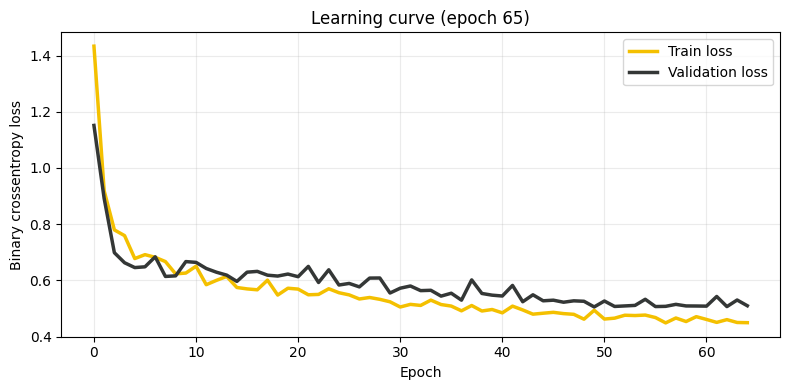
21/21 ━━━━━━━━━━━━━━━━━━━━ 0s 3ms/step - accuracy: 0.7979 - loss: 0.4499 - val_accuracy: 0.7803 - val_loss: 0.5101
Best val_accuracy: 0.7937
[6]:
proba_test = model.predict(X_test.values, verbose=0).reshape(-1)
pred_test = (proba_test >= 0.5).astype(int)

print(f"Test accuracy: {accuracy_score(y_test.values.reshape(-1), pred_test):.4f}")
print(classification_report(y_test.values.reshape(-1), pred_test, digits=4))
Test accuracy: 0.7892
              precision    recall  f1-score   support

           0     0.8082    0.8613    0.8339       137
           1     0.7532    0.6744    0.7117        86

    accuracy                         0.7892       223
   macro avg     0.7807    0.7679    0.7728       223
weighted avg     0.7870    0.7892    0.7868       223
5. Sklearn-like wrapper for Shapash
Shapash detects classification with the classes_ and predict_proba attributes. We add a lightweight wrapper around the Keras model.
[7]:
class KerasBinaryClassifierWrapper:
    def __init__(self, keras_model, threshold=0.5):
        self.keras_model = keras_model
        self.threshold = threshold
        self.classes_ = np.array([0, 1])
        self._classes = [0, 1]

    def predict_proba(self, X):
        p1 = self.keras_model.predict(np.asarray(X), verbose=0).reshape(-1)
        p0 = 1.0 - p1
        return np.column_stack([p0, p1])

    def predict(self, X):
        p1 = self.predict_proba(X)[:, 1]
        return (p1 >= self.threshold).astype(int)

wrapped_model = KerasBinaryClassifierWrapper(keras_model=model, threshold=0.5)
6. Compiling SmartExplainer
We use the shap backend here to keep computation time reasonable for a tabular deep learning model.
[8]:
# Keep explanation runtime low for a notebook demo
n_explain = min(200, len(X_test))
X_explain = X_test.sample(n=n_explain, random_state=42)
y_target_explain = y_test.loc[X_explain.index]

y_pred = pd.DataFrame(
    wrapped_model.predict(X_explain),
    index=X_explain.index,
    columns=['Survived']
)

response_dict = {0: 'Deceased', 1: 'Survived'}

xpl = SmartExplainer(
    model=wrapped_model,
    preprocessing=encoder,
    features_dict=titanic_dict,
    label_dict=response_dict,
    backend='shap',
    title_story='Titanic survival with a Keras'
)

xpl.compile(
    x=X_explain,
    y_pred=y_pred,
    y_target=y_target_explain
)
INFO: Shap explainer type - <shap.explainers._exact.ExactExplainer object at 0x12e970440>
ExactExplainer explainer: 201it [00:55, 3.10it/s]
7. Shapash plots in the notebook
[9]:
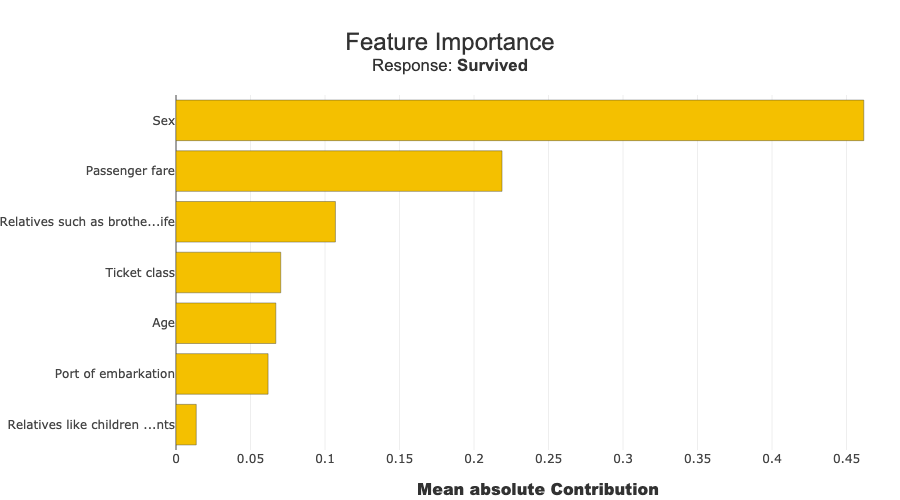
xpl.plot.features_importance()
[10]:
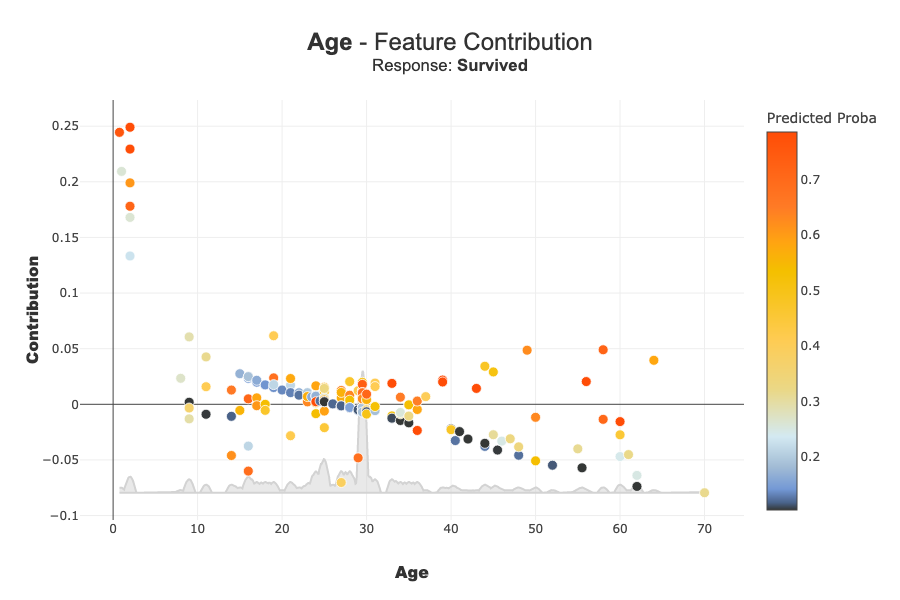
xpl.plot.contribution_plot('Age')
[11]:
row_id = X_explain.index[0]
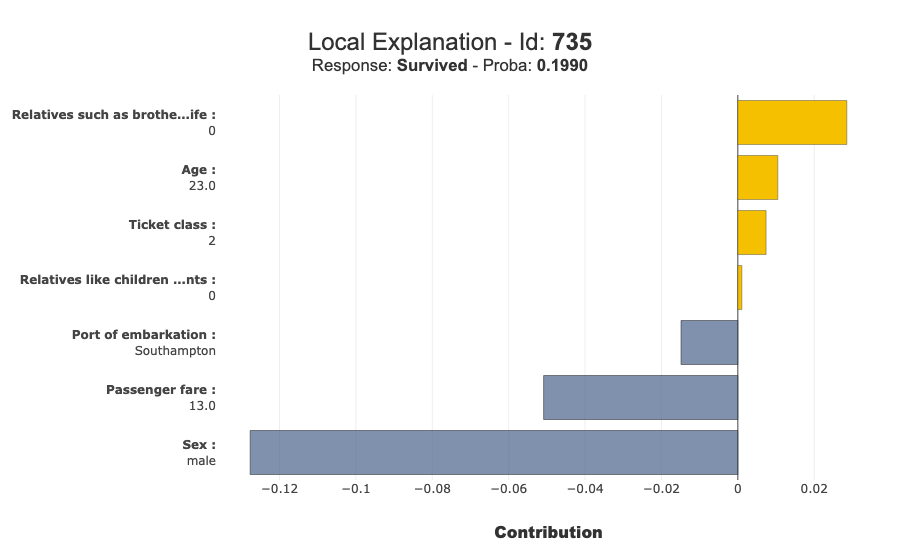
xpl.plot.local_plot(index=row_id)
[12]:
xpl.to_pandas(max_contrib=8).head(10)
[12]:
| Survived | feature_1 | value_1 | contribution_1 | feature_2 | value_2 | contribution_2 | feature_3 | value_3 | contribution_3 | ... | contribution_4 | feature_5 | value_5 | contribution_5 | feature_6 | value_6 | contribution_6 | feature_7 | value_7 | contribution_7 | |
|---|---|---|---|---|---|---|---|---|---|---|---|---|---|---|---|---|---|---|---|---|---|
| 735 | Deceased | Sex | male | 0.127684 | Passenger fare | 13.0 | 0.050851 | Relatives such as brother or wife | 0 | -0.028539 | ... | 0.014882 | Age | 23.0 | -0.010472 | Ticket class | 2 | -0.007397 | Relatives like children or parents | 0 | -0.001051 |
| 625 | Deceased | Sex | male | 0.116236 | Relatives such as brother or wife | 0 | -0.028845 | Ticket class | 3 | 0.025976 | ... | 0.021563 | Age | 21.0 | -0.017173 | Port of embarkation | Southampton | 0.014301 | Relatives like children or parents | 0 | -0.000764 |
| 104 | Deceased | Sex | male | 0.125619 | Passenger fare | 8.65 | 0.088861 | Relatives such as brother or wife | 0 | -0.025193 | ... | 0.020886 | Port of embarkation | Southampton | 0.013359 | Age | 33.0 | 0.012455 | Relatives like children or parents | 0 | -0.000961 |
| 388 | Survived | Sex | female | 0.286759 | Relatives such as brother or wife | 0 | 0.032435 | Passenger fare | 13.0 | -0.023769 | ... | -0.014274 | Ticket class | 2 | 0.011565 | Relatives like children or parents | 0 | 0.006016 | Age | 36.0 | 0.002935 |
| 342 | Survived | Sex | female | 0.206648 | Relatives such as brother or wife | 3 | -0.121622 | Passenger fare | 263.0 | 0.106484 | ... | 0.015445 | Port of embarkation | Southampton | -0.010942 | Age | 24.0 | -0.008412 | Relatives like children or parents | 2 | 0.005304 |
| 352 | Deceased | Sex | male | 0.115636 | Passenger fare | 35.0 | -0.064915 | Ticket class | 1 | -0.048789 | ... | -0.031078 | Port of embarkation | Southampton | 0.011676 | Relatives like children or parents | 0 | -0.004565 | Age | 29.5 | 0.002919 |
| 367 | Survived | Sex | female | 0.244876 | Passenger fare | 75.25 | 0.170982 | Ticket class | 1 | 0.05393 | ... | 0.038142 | Age | 60.0 | -0.01554 | Relatives such as brother or wife | 1 | -0.008888 | Relatives like children or parents | 0 | 0.004335 |
| 296 | Deceased | Sex | male | 0.10905 | Ticket class | 1 | -0.045848 | Passenger fare | 27.72 | -0.035266 | ... | -0.030661 | Port of embarkation | Cherbourg | -0.030228 | Relatives like children or parents | 0 | -0.004339 | Age | 29.5 | 0.004128 |
| 428 | Survived | Sex | female | 0.242509 | Relatives such as brother or wife | 0 | 0.040903 | Passenger fare | 26.0 | 0.026343 | ... | 0.023752 | Port of embarkation | Southampton | -0.011517 | Ticket class | 2 | 0.011443 | Relatives like children or parents | 0 | 0.004754 |
| 824 | Survived | Sex | female | 0.266229 | Relatives such as brother or wife | 0 | 0.03253 | Passenger fare | 12.48 | -0.031449 | ... | -0.025467 | Port of embarkation | Southampton | -0.013692 | Relatives like children or parents | 1 | -0.008707 | Age | 27.0 | 0.005659 |
10 rows × 22 columns
8. (Optional) Launch the Shapash WebApp
As in shapash/webapp/webapp_launch.py, you can also launch the interactive application:
[13]:
xpl.init_app()
app = xpl.smartapp.app
app.run_server(host='localhost', port=8050)